C# Malware Emulation
Controlled Execution: Malware Analysis and Emulation in C#
This is an article meant for educational purposes only documenting my experience building an emulator in C# to combat suspicious .NET assemblies.
The code provided below is only representative. If you are interested in a working example, you can find it on my Github page.
Reverse engineering is a vast field of many overlapping domains, two of which are analysis and binary patching, and share the same end goal of understanding what the program actually does by studying how it behaves and when.
Patching takes it to the next step of interfering with the program's execution. Meanwhile, static analysis can tell a great deal about a file's structure, like inspecting its strings, imports and decompiling its code, doubly easy for .NET assemblies. But some programs deliberately hide their useful information until they begin running.
While it is possible to retrieve a decent chunk of information still using techniques like heuristic scanning as I have talked about here before - there will always be an end to the amount of information that can be extracted when a string no longer resembles itself, where not even fuzzy hashing can be useful.
That is where emulation sits, somewhere in between the goal of static analysis and binary patching.
Programs contain data that their framework translates into useful information, like strings and structures. A packer is software used by malware and legitimate applications alike - encrypt and hide information so it is not retrievable by unauthorized actors. Meanwhile, the decrypted information freely flows in between the packer's framework, .NET and the operating system to actually run. Emulation is essentially intercepting what the packer is sending by acting as the .NET framework and OS.
Of the possible solutions is to dump the program's memory to access the decrypted data. But that exposes a major problem.
What are we trying to achieve?
If we are dealing with a packed, suspicious .NET application, depending on the level of obfuscation, even ASCII strings will all be gibberish, at best readable characters, let alone function names or code.
The approach is to reproduce a hardened environment with the bare requirements for that suspected program to run. Through this, instead of asking Windows and the .NET runtime to execute the program, we read its instructions and interpret them ourselves, eliminating the previously mentioned problem - exposing the system to possibly malicious code running.
It is often a philosophy of mine. No matter how secure a system may be, minimizing the risk always takes priority. Sure, it is never ran on bare metal, but what if it manages to escape the virtual machine or exploit the network? Much like a harsh winter, it is always about extra layers. No bridging between the VM and the host. Always sandboxing samples in the VM, and always prioritizing static analysis first. It goes: Sandboxing, isolation and disposable environments.
Concept of a Small Virtual Machine
An emulator performs operations internally, say addition and subtraction, and while the original instruction was understood, it was not handed to the processor or the .NET JIT compiler as executable guest code. This process is referred to as interpretation. For most .NET software, those instructions are Common Intermediate Language (CIL) - and are intercepted, roughly speaking, by the emulator, acting like a middle layer of virtualization, creating its own version of local variables, arguments, objects, threads and memory.
Although it is a virtual machine in the common sense, it does not necessarily mean it is akin to the likes of VMware or Hyper-V. It is merely an artificial execution environment tailored to .NET software.
Within the environment the program interacts with a virtual call frame, a block of information containing function arguments, local variables, return addresses and saved registers.
Example:
csharp
void foo(int x) {
    int y = x + 1;
    bar(y);
}The virtual heap handles the stack, returning the value for the add instruction and subroutine for bar, making the program believe these concepts exist because the emulator provides them. This allows every operation to pass through code that the analyzer controls.
How can Stubbing Help?
A program is constantly interacting with the operating system and .NET libraries. What files exist? What machine is running? Give me access to the registry. Start a process. Let me allocate unmanaged memory.
To contain the file within our environment, those variables and much more can be virtualized.
When System.Diagnostics.Process is requested by the guest code - the code running within the virtualized environment - the emulator does not need to create a real process, it merely needs to represent the record of one, and log the program's request.
Using C# we can utilize a library such as dnlib and read an assembly's metadata and CIL without directly executing it. From there, the emulator can create representations for the call frames, stacks, objects and virtual memory, essentially replacing the CLR's connection to the host machine.
A simplified way of imagining it: Read an instruction -> Determine what it means -> Modify the virtual state of the environment -> Move onto the next instruction. This is the basic idea of runtime, only change is that we are emulating it. The complexity grows from accurately modelling the behavior depending on those instructions.
Stubbing in this case is representing a functionality with a small substitute.
csharp
bool CheckLicense()
{
 // Lots of code and checks.
}instead becomes:
csharp
bool CheckLicense()
{
return true;
}Step 1 - Handling Virtualization
Consider we have a basic program:
csharp
Console.WriteLine("Hello, World!");After compilation, the method translates to CIL roughly equivalent to:
Code
ldstr "Hello, World!"
call void System.Console::WriteLine(string)
retThe CLR - the runtime - would normally read those instructions, compile them into native machine code to be capable of running on the actual machine. Our emulator avoids this step. Instead, we can use dnlib to inspect the assembly's method body as so:
csharp
var module = ModuleDefMD.Load("HelloWorld.exe");

var programType = module.Types
  .First(x => x.Name == "Program");

var main = programType.Methods
  .First(y => m.Name == "Main");

foreach(var instruction in main.Body.Instructions){
  Console.WriteLine($"{instruction.OpCode} > {instruction.Operand}");
}Using the code above, our output will be:
Code
nop >
ldstr > Hello, World!
call > System.Void System.Console::WriteLine(System.String)
nop >
ret >The nop means no operation - it is not relevant to us right now, but I have included it for the sake of accuracy, but the most important thing is how the simple Hello World application was translated into instructions without actually executing the code.
Now we can translate those CIL instructions into smaller understood by our VM:
csharp
public enum VmOpCode{
  LoadString,
  Call,
  Return
}

public clasc VmInstruction{
  public VmOpCode OpCode{get; init;}
  public object? Operand {get; init;}
}Now we can translate the instruction:
csharp
static VmInstruction Translate(Instruction instruction){
  if(instruction.OpCode == OpCodes.Ldstr){
    return new VmInstruction{
        OpCode = VmOpCode.LoadString,
        Operand = (string)instruction.Operand
    }
  }

  if(instruction.OpCode == OpCodes.Call){
    retur new VmInstruction{
      OpCode = VmOpCode.Call,
      Operand = instruction.Operand
    }
  }
}As such, we can construct a VmMethod directly from the real method:
csharp
Var vmMethod = new VmMethod{
  Name = main.FullName
}

foreach (var instruction in main.Body.Instructions){
  vmMethod.Instructions.Add(Translate(instruction));
}Now the VM can interpret it. For ldstr - which is LoadString - the CLR would normally obtain the string from the assembly's metadata and reference it on its stack. The emulator instead performs the operation using its own stack:
csharp
case VmOpCode.LoadString:
{
  string value = (string)instruction.Operand;
  Stack.Push(new VmVaue(value));
}Now the virtualized state in essence would look like:
Temporary Stack:
- "Hello, World!"
But it is very important to differniate between invoking the real method using say, reflection, and intercepting the call, because the former would cross from simulated into real behavior territory.
csharp
case VmOpCode.Call:
{
  var target = instruction.Operand;
  ExecuteCall(target);
}then ExecuteCall would deiced what the method means within the virtual envionrment:
csharp
private void ExecuteCall(Method target){
  string typeName = target.Type.FullName;
  string methodName = target.Name;

  if(typeName == "System.Console" && methodName == "WriteLine"){
    var value = Stack.Pop();

    Console.WriteLine($"{value}")
  }
}As such, the guest code never actually runs or executes Console.WriteLine. Instead, the emulator sees what the guest wanted, removes it from the virtualized temporary stack, then record.
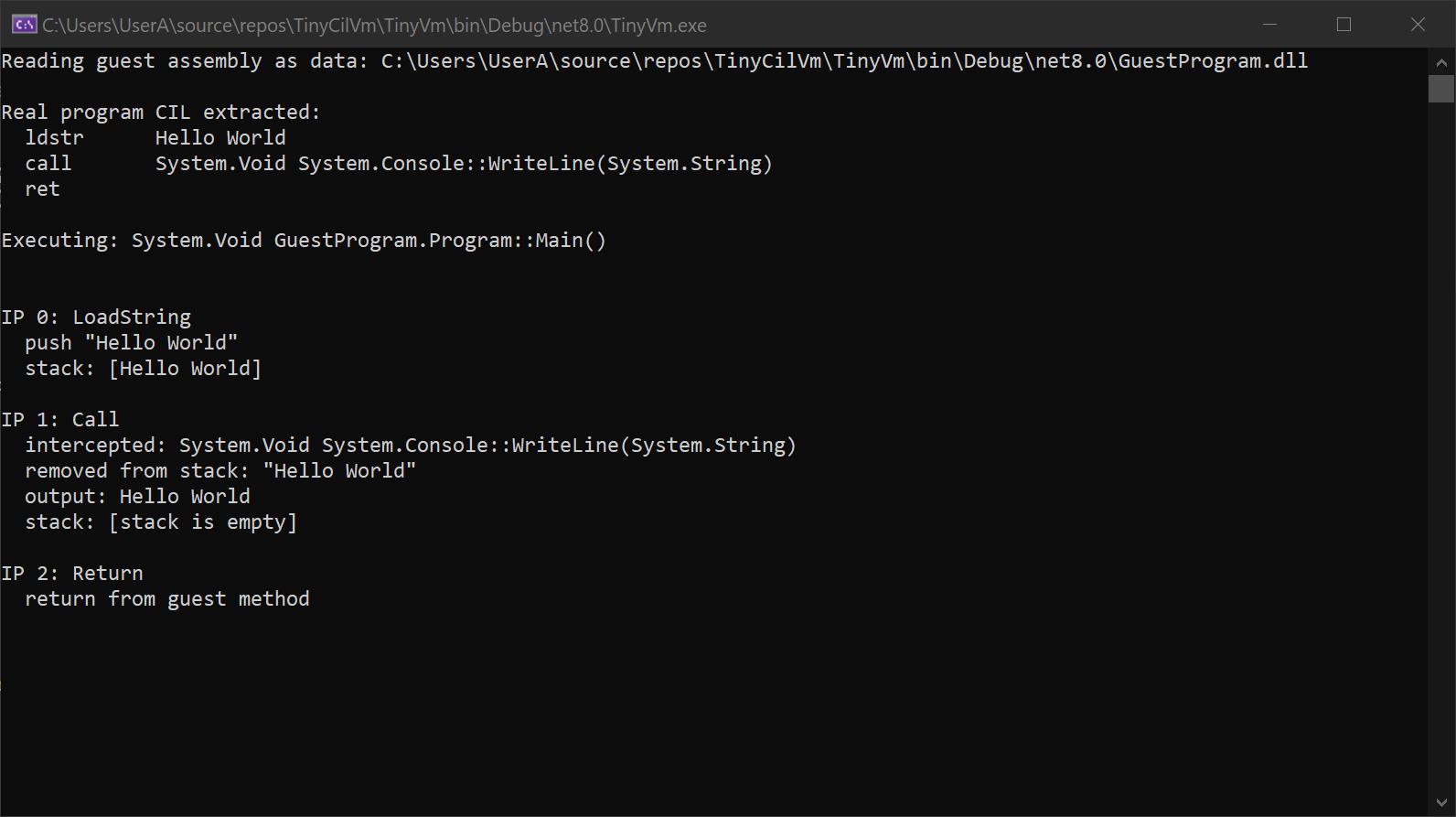
Essentially the guest CIL asks:
- Load "Hello, World!".
- Call Console.WriteLine.
- Return.
Then the VM interprets it as:
- Push string into the VM Stack.
- Pop the string, as in removing it from the stack.
- Record Console.WriteLine and simulate it if necessary.
- End the VmMethod.
Debugging - Same Same, but Different
The emulation behaves like a powerful debugger where the execution and runtime belongs to it. There is no need to inspect an allocation after it occurs because the emulator created allocation, making instruction/call tracing and memory inspection natural parts of the design.
For malware analysis, this is used as a bigger routine around decrypting and unpacking assemblies by automatically saving the resulting buffer after the data has been decrypted, automatically.
This is a particular part where malware analysis can divert from other domains in the reverse engineering field. The end goal can differ from one specialist to another. Are you studying a malware sample to see how it behaves in specifics? Are you attempting to recover crumbs of data? In reality, a heavily obfuscated and packed .NET file is often difficult to fully unravel because what is lost is hardly ever fully restored, but this method provides analysts with yet another weapon in their arsenal to find as much information as possible. Recovering IP addresses, domains, import tables, and stray ASCII strings hinting toward registry usage or directory paths can help build a clearer picture, especially in incident response where any bit can point toward what the malware targeted and where it might have burrowed.
Step 2 - Security
I can go on and on for days about the security relating to creating such a VM because I can never recommend enough not creating a small VM and believing it will be the perfect emulating environment. If such a project can have a motto it would be: Treat every byte, metadata value, RVA, size, point, string or anything else as an attacker controlled object. Denying anything that can cross into the host is a must and goes without saying, but to always use bounded parsing to prevent unexpected leakage from the virtualized environment.
Malformed entries like sizes or addresses can falsely push the emulator into breaking itself due to incorrect bounds, or worse to allow the guest code to escape due to memory corruption.
If a file contains 4 KBs of metadata, yet the header claims to be 4 GBs. Without accounting for such an attack, the parser will simply go:
Code
size = metadata.Size;
buffer = new byte[size];And we are left with bloated allocated memory, or causing integr overflow.
Similarly, recursive and deep nested generics can lead to stack exhaustion, falsified RVA mappings, corrupted IL including invalid or unknown opcodes/operands and stack overflow, path escapism using absolute/UNC paths in hopes of escaping the virtual environment to exposing the host, and like the stack exhaustion, CPU can be overworked due to instructions, loops and compressions, and many more.
- That is why the principal is equally important as as the individual protections. Bound the memory, CPU and stack available to the emulator, then move onto blocking the execution of code you haven no use for, like Shell and Process.Start, and especially native-code execution like P/Invokes and LoadLibrary.
Step 3 - Obfuscation and Packing
But Joey, you may ask, what is the point of giving an example for a .NET assembly that is not packed or malicious, isn't that the entire point of an emulator? How can it read CIL if it is obfuscated?
It is true, the example I gave was simple but as with anything, it is necessary to have a good foundation and start tackling the bigger concepts one at a time. In reality, LoadString, Call and Return are not the only instructions either, but they are real and are important to know.
An obfuscator changes the program in ways that preserve its behavior while making the code harder to understand, like changing the names of methods and encrypting strings.
Packing on the other hand goes a few steps further. Instead of leaving the original program body available, it may store the encrypted/compressed payload and reconstruct the real code only when the program starts.
The earlier Hello World IL would suddenly turn into something, in concept, similar to:
Code
ldstr "MyEncryedStringWithManyRandomCharacters"
call DecryptString
call Console.WriteLine
retThe useful information we are after exists, but it is no longer stored in the method body. That is where the strength of an emulator shows over a static analysis tool would show. We are not after understanding the routine, but rather following it until the guest instructions lead us to the treasure itself in our virtual memory where the decoded string resides, and suddenly the encrypted string comes out as, "Hello, World!".
A packed .NET assembly may contain a loader. The real program exists, but as encrypted data inside that loader as random data. However, at runtime that loader begins unpacking it:
- Read the encrypted data -> Decrypt -> Reconstruct .NET assembly -> Load it. To our emulator, we simply catch that reconstructed .NET assembly.
Limitations
As with anything, this approach is not perfect. From the development of the underlying VM environment itself to the output of the less obstructed assembly, it will never be perfect. To speak of the former, coverage plays a big part. What if the instruction is foreign to the VM? What do when the execution stops then?
Another one is coverage of the runtime we are attempting to replace - .NET - It is not realistic to expect to condense decades of implementation into one small VM, like .NET APIs, and even then how should they be handled?
File.ReadAllBytes, Assembly.Load, Marshal.Copy ... handling each one needs to be decided. Simulated? Return fake data? Blocked? Or do we just want to log it? Multiply by thousands of methods and you are looking at reproducing the .NET framework itself.
Anti-debug/emulation is an extension of that. Some software may employ checks to check if the environment is virtualized by inspecting registry keys or environment variables, leading the emulator down false paths, or even focused attacks in hopes of breaking or escaping it altogether.
That is why static analysis usually shifts from the idea of having complete control over the entire application to have enough data to help with the analysis.
This also means class names, method names, variables and other valuable information can be lost half way.
The original method named "RunConfiguration()" after packing turns into "aaabbbccc()", meanwhile after emulation it becomes "method_18()", turning the code from:
csharp
string myConfig = RunConfiguration();
Console.WriteLine(myConfig);to
csharp
string v1 = method_17(0);
Console.WriteLine(v1);At worst, the code turns into psuedocode because the information itself no longer exists in the compiled file. It was lost when it was deliberately removed at compilation.
Step 4 - Complete Emulator
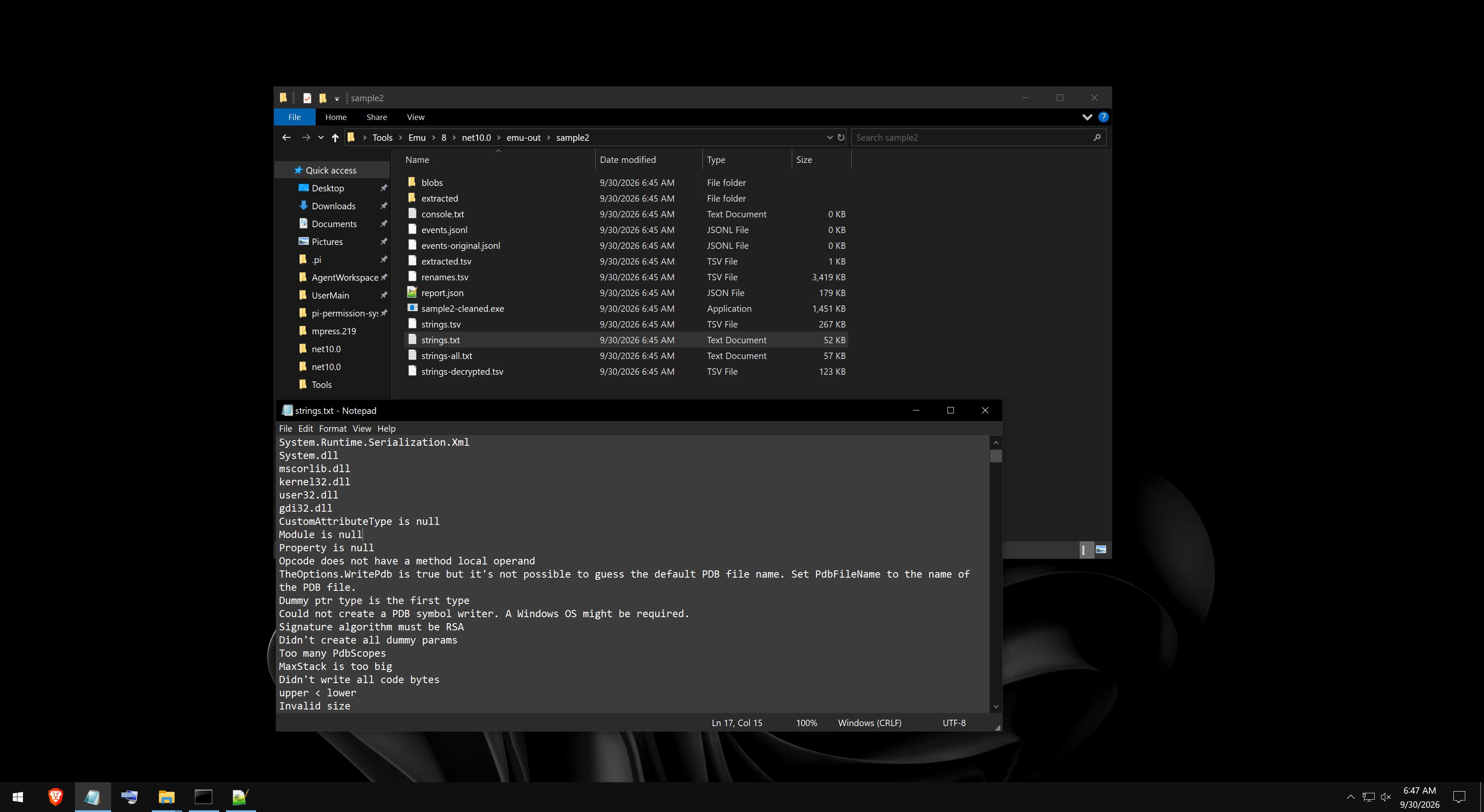
This is a study on my findings throughout my experience creating my own emulator for emulating .NET malware and unpacking highly obfuscated assemblies, often packed under three or four packers, proving that .NET code is always susceptible to such attacks regardless of how hard we work at protecting it.
The emulator works in steps by first emulating the application, cleaning and deobfuscating the assembly using a script to restore as much data as possible, then extracting all the relevant data.
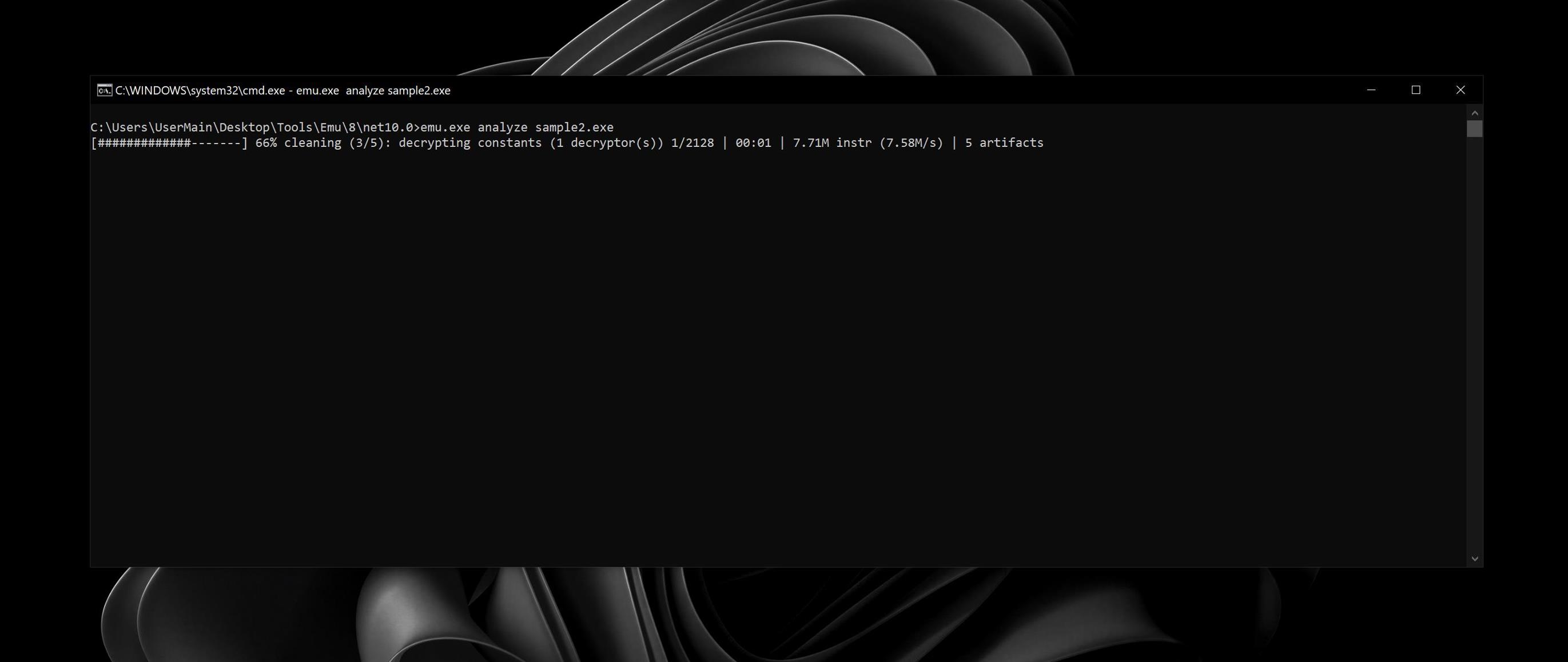
Then it proceeds with the output, containing the arguments the virtual machine was launched with, showing the limitations placed upon it to prevent the guest code from using too much resources. Instead, it has a cap on CPU and memory to protect against anti-emulation techniques, along with the output and any potential errors.
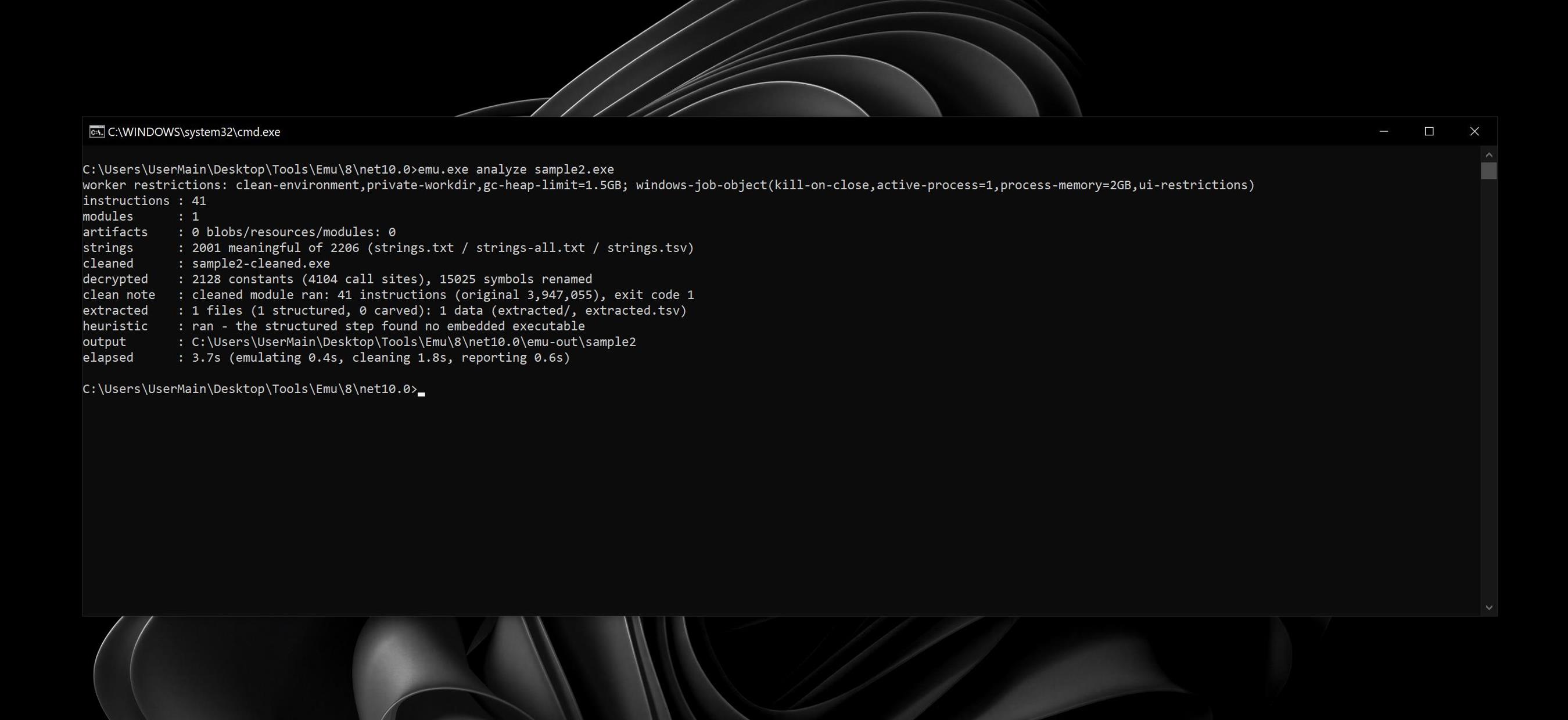
And finally, the output strings which were not possibly recoverable beforehand using just unpackers/deobfuscators. It was a milestone in my reverse engineering career to achieve this level of analysis without using techniques like memory dumping. It includes the output of strings, images, blobs and any embedded executables.